Blackmagic Camera
- 4.6
- Rating
- 1.00M
- Installs
- Free
- Price

 Analysis by App-foxy
I spent time with Blackmagic Camera as a serious mobile photography and video tool, and my first impression was that it treats a phone less like a casual snapshot device and more like a compact digital film camera. That approach is exciting when I want control over an image, but it also changes the learning curve. This is not simply a point-and-shoot replacement for the camera app already on your phone. It is a focused app for people who want to make deliberate decisions about exposure, focus, color, and recording.
Developed by Blackmagic Design Inc., the app is free and aimed at everyone from curious beginners to experienced creators. It belongs in the photography category, although its strongest identity is clearly connected to video production. The app launched on June 3, 2024, and the current version is 3.3.2.0001. Its 4.4 average from around 11 thousand ratings and more than a million installs suggest that it has found an audience beyond professional camera operators.
What I like most is that the app gives me a reason to slow down before pressing record. The usual phone camera is excellent when speed matters, while this app is more useful when the shot itself matters. I can think through the light, decide how much of the scene should be sharp, and work toward footage that feels consistent from one clip to the next. The trade-off is that the interface asks more from me, both visually and physically, than a basic camera app does.
You May Also Like

 Blood Strike: 2.5 Anniversary
Blood Strike’s Loadouts Turn Every Drop Into a Tactical Gamble
A close look at Blood Strike’s custom loadouts: how fast access to signature weapons reshapes its battle royale rhythm, rewards preparation, and narrows the gap between fights.

 Pandora - Music & Podcasts
Pandora’s Music Is Easy to Start, but Harder to Recover
Pandora’s strength is its low-effort path from a seed to a station. Its weak spot is how much confidence it asks you to place in connection, setup, and quiet recovery.

 8 Ball Pool
 Is Built on Rivalries, Rematches, and Routine
A close look at the rivalries, rematches, shared routines, and unanswered safety questions that turn a quick pool match into a persistent mobile community.

 Samsung Music
’s Quiet Strength Is Playing What You Already Own
Its reach comes less from spectacle than from dependable access to a personal library. That simplicity is both the app’s strongest retention engine and its ceiling.

 AccuWeather: Weather Radar
AccuWeather Review: A Quick, Clear Forecast for Everyday Decisions
For everyday plans, the best forecast is the one you can understand quickly. AccuWeather makes rain timing, radar, and local conditions easy to act on, with a few trade-offs.

 Hill Climb Racing
Why Hill Climb Racing Still Turns Crashes Into One More Run
A tiny car, a bumpy hill and one more upgrade: Hill Climb Racing keeps resurfacing because its simple chaos makes every near-miss feel personal.
More From Our News Desk
View All News


How the interface supports careful shooting
I find that the interface’s real value becomes clearer after the first few experiments: it can turn careful framing and exposure into a repeatable routine rather than a one-off burst of tweaking. I’ll look next at what keeps that routine worthwhile over time, including when the extra attention pays off and when I would reach for the simpler camera instead.
Readability and navigation while composing a shot
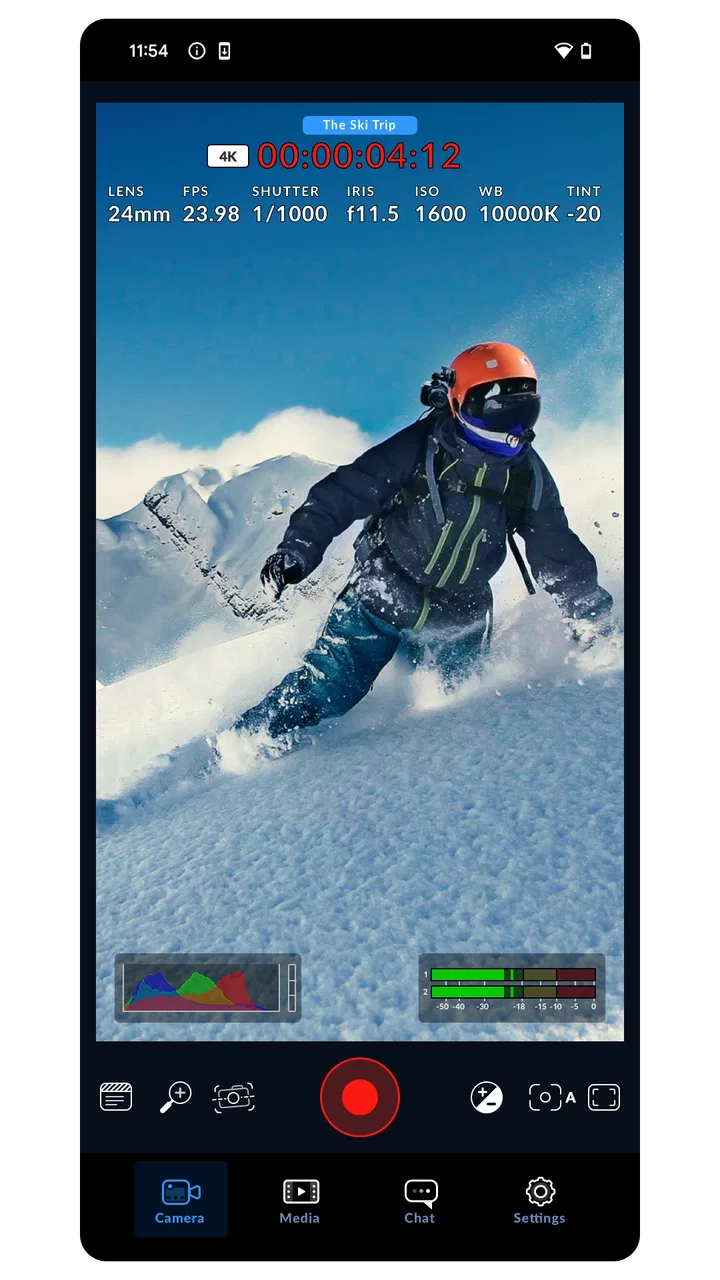
The controls are built around the language of high-end digital film cameras rather than the simplified layout of a typical phone camera. That makes the interface feel purposeful. Instead of hiding every decision behind automatic processing, it places important camera choices close to the live preview. For me, this is valuable because I can judge the image while changing a setting instead of jumping through several unrelated menus.
That clarity comes with a cost. A beginner may recognize the camera preview immediately but still wonder which control deserves attention first. Exposure, focus, frame choices, and image processing are not equally important in every situation. I found it easier to use the app when I adopted a simple order: compose the shot, check brightness, confirm focus, and only then worry about more advanced adjustments. Trying to change everything at once made the experience feel busier than it needed to be.
The interface is most readable when I hold the phone steadily and give myself time to inspect the preview. In bright outdoor scenes, the live image can be easier to understand than a collection of tiny menu labels because the result is visible immediately. Indoors or at night, however, I need to pay closer attention. A dark preview can make it harder to distinguish a deliberate low-light look from an image that is simply underexposed.
The most useful habit is to treat the preview as a decision-making workspace, not just a viewfinder. Before recording, I look for distracting highlights, faces that may fall into shadow, and backgrounds that compete with the subject. This is a small change from casual phone photography, but it prevents many problems that are difficult to fix later.
Learning the controls without feeling lost
I would not recommend opening the app for the first time immediately before an important event. The controls are approachable once I understand their purpose, but the app rewards practice. A short test session in a familiar room is enough to learn where I naturally look for exposure and focus information. I also recommend recording a few clips with different settings and reviewing them on the phone. That reveals which changes are genuinely helpful for my style and which only add complexity.
For a new user, the strongest starting point is to leave most choices alone and concentrate on one variable at a time. I begin with exposure, then try focus control, and only later explore the more film-oriented processing options. This staged approach makes the app feel less intimidating and gives me a clearer sense of cause and effect.
Compared with a standard camera app, the navigation is less forgiving of hurried fingers. A casual app usually assumes that the phone should decide almost everything. Here, I am expected to participate. That is a strength for controlled work and a weakness when I need an instant photo of a moving child, a pet, or a fleeting street moment.
Useful workflows for real projects
One of my favorite practical uses is filming a short interview or product demonstration at home. I can place the phone on a stable support, frame the subject, check the light from a nearby window, and make the image look intentional before speaking. The app is especially helpful when I want several clips to feel as though they belong to the same project rather than looking like unrelated phone recordings.
Another useful workflow is capturing reference footage for editing later. I can record a scene with more attention to consistency, then compare clips on a larger screen during the edit. This is different from sending a quick video through a messaging app, where convenience and immediate sharing usually matter more than careful image control.
A less obvious benefit is that the app encourages me to separate capture from editing. With a basic phone camera, I often rely on automatic processing and try to repair the look afterward. Here, I make more of the visual decisions at the moment of recording. That can reduce the temptation to use heavy filters later, although it also means mistakes at capture time are more consequential.
Motor considerations and the physical act of filming
Using manual camera controls requires more precise touch interaction than tapping a large shutter button. If I am holding the phone in one hand, changing a setting while keeping the composition steady can be awkward. The challenge becomes more noticeable when I am walking, filming in a crowded place, or trying to react quickly.
I get better results when I use both hands or support the phone against something stable. That is not a special accessory requirement so much as a practical consequence of the app’s design: thoughtful control works best when the device itself is not moving. People with limited reach, tremor, reduced grip strength, or difficulty performing small touch gestures may find the app more comfortable when the phone is mounted or placed on a surface.
For a seated setup, the experience is much more manageable. I can position the phone first and then make adjustments without constantly fighting gravity or camera shake. This makes the app a good fit for tabletop demonstrations, online lessons, interviews, cooking videos, and other scenes where the subject stays within a planned area.
On the other hand, the app is less suitable when I need to operate the camera from a distance or change controls while moving. The more I depend on quick physical reactions, the more attractive the simpler phone camera becomes. I would choose the ordinary camera app for a spontaneous group photo, even though I would choose Blackmagic Camera for a planned clip where consistency matters.
Sensory considerations: vision, sound, and attention
The visual preview is central to the experience, so the app asks me to inspect brightness, focus, and composition continuously. That can be helpful for someone who prefers visual feedback before recording, but it can also create a demanding screen experience. Small changes in the image may require concentration, especially when the scene contains strong contrast or several competing subjects.
I find it easier to work when I simplify the scene. A plain background, a stable subject, and controlled lighting make the visual information easier to interpret. In a busy street, the app’s control may be technically useful but mentally expensive. There are more things to watch, and the need to monitor the image can compete with the need to stay aware of people, traffic, and surroundings.
People who are sensitive to visual clutter may prefer a prepared setup rather than spontaneous filming. I would also avoid making critical exposure decisions under harsh glare on the phone screen. Moving into shade or checking the result in a calmer environment can make the same controls feel much more understandable.
Sound is another part of practical access, even though the app’s identity is strongly visual. When I record an interview, I need to think about the environment as a whole rather than concentrating only on the image. A quiet room, a stable phone position, and a short test recording help me notice problems before the real take. This is a good example of why the app cannot solve every production issue by itself: camera control is only one part of making usable media.
Situational access in everyday filming
The app works best when I can prepare. Imagine recording a craft tutorial at a kitchen table. I can arrange the materials, place the phone where my hands remain visible, check whether the work surface is too bright, and record several sections with a similar visual style. In that situation, the extra control is genuinely useful, and the slower workflow does not feel like a burden.
Now imagine trying to capture a dog running through a park. The priorities change. I need speed, a secure grip, and a high chance of getting a usable moment. The ordinary camera app may be the better option because it removes decisions that would otherwise delay me. Blackmagic Camera is not inferior in that situation; it is simply designed around a different kind of success.
Travel is somewhere in between. For a planned landscape or a short travel film, I appreciate the ability to work more deliberately. For a quick photo while boarding a train, I would rather use the default camera. This distinction matters because the app can be excellent in one part of a day and unnecessarily demanding in another.
It is also useful for creators who need a repeatable process. If I am making several clips for a course, social channel, portfolio, or personal project, I can establish a visual routine and follow it. That consistency is more valuable than having the maximum number of controls. The app earns its place when it helps me repeat a result, not merely when it gives me more settings to explore.
Where the usual alternatives are better
The built-in camera on a phone wins for speed, familiarity, and low effort. It is usually the right choice when another person needs to borrow the phone, when the subject will disappear quickly, or when I want to take a picture without thinking about production technique. Its simplicity is a feature, not a flaw.
Social media cameras are even more immediate. They are convenient for quick posts and messages, especially when I want to capture, decorate, and share in one flow. Blackmagic Camera makes more sense when I care about the original footage and want to make creative decisions before sharing it.
Dedicated camera apps with a simpler manual layout may suit someone who wants only a few extra controls. Blackmagic Design’s approach is more ambitious. It feels closer to a production tool, which can be rewarding for a creator who understands why manual choices matter. It may be excessive for someone who only wants a brighter selfie or a fast food photo.
The app is free, which lowers the barrier to trying it, but free does not mean effortless. The real investment is time and attention. I need to learn the controls, test the results, and accept that careful capture takes longer than automatic capture. That is a fair trade for the right user, but it should be part of the decision before installing it.
Remaining barriers and practical workarounds
The biggest barrier is not a lack of ambition; it is the gap between professional-style control and the small surface of a phone screen. A control that feels clear on a larger camera can feel compressed on a handheld device. I reduce that friction by preparing the shot first and changing only the setting that solves the current problem.
Another barrier is divided attention. When I am monitoring the image, holding the phone, watching the subject, and thinking about the next adjustment, the app can become demanding. A tripod or stable support changes the experience dramatically. It frees my hands and lets me judge the preview rather than merely trying to keep the phone upright.
Users who need very rapid operation should be honest about that requirement. The app is not my first recommendation for unpredictable action, quick family snapshots, or situations where I cannot safely look at the screen. In those cases, a simpler camera reduces both physical effort and cognitive load.
I also advise new users to create a repeatable pre-recording routine. I check the framing, look at the brightest area of the scene, confirm that the subject is where I expect, and make a short test clip. This routine is more inclusive than trying to memorize every control because it turns a complicated tool into a sequence of manageable decisions.
Who should install it
I recommend the app to mobile filmmakers, students learning camera technique, independent creators, and anyone who feels limited by automatic phone processing. It is particularly strong for planned work: interviews, demonstrations, short documentaries, controlled portraits, and clips that need a consistent visual approach.
I would also recommend it to curious beginners who enjoy learning by experimenting. The app gives a beginner a practical way to understand how camera decisions affect the final image. It is not necessary to master everything at once. Starting with one adjustment and reviewing the result can turn the learning process into something concrete.
I would skip it if my main goal were instant sharing, effortless family snapshots, or one-handed photography while moving. I would also hesitate if I dislike monitoring a screen closely or if I rarely have time to prepare a shot. In those situations, the default camera is likely to be more comfortable and more successful.
My inclusive verdict after using it
Blackmagic Camera is an unusually serious free photography app because it asks the phone to behave like a deliberate filmmaking instrument. I value its control, its visual discipline, and the way it encourages me to think before recording. The same qualities create its limitations: the interface can be demanding, the physical operation benefits from stability, and fast situations favor a simpler alternative.
Its Everyone age rating makes it approachable in principle, but accessibility in practice depends heavily on the person, the scene, and the way the phone is held. I found the app most welcoming when I prepared the environment, reduced the number of decisions, and used a stable setup. That combination gives people more time to understand the image and less pressure to perform several precise actions at once.
With more than 443 reviews alongside its broader rating base, it has clearly generated substantial user discussion, and I can understand why. This is not an app I would install merely to replace a casual camera. I would install it when I want my phone footage to feel planned, consistent, and personally shaped. For that purpose, it is a strong recommendation, provided I am willing to trade instant convenience for meaningful control.
FAQs for Blackmagic Camera
01What features does the Blackmagic Camera app offer?
The Blackmagic Camera app provides a suite of professional-grade features, including 4K recording, advanced color grading, and customizable frame rates. It also offers intuitive controls for focus and exposure, making it a versatile tool for filmmakers and hobbyists alike. These features ensure high-quality video capture directly from your smartphone.
02Is the Blackmagic Camera app compatible with both Android and iOS devices?
Yes, the Blackmagic Camera app is available for both Android and iOS platforms. However, it's essential to check the specific system requirements for your device, as some older models may not support all features. This ensures you can fully utilize the app's capabilities without performance issues.
03How does the Blackmagic Camera app enhance video quality?
The app enhances video quality by offering professional-grade settings like manual control over focus, exposure, and ISO levels. It supports formats such as ProRes and DNxHD, known for their high quality. Additionally, its advanced color grading tools allow for precise color correction, providing a cinematic look to your videos.
04Are there any subscription fees or in-app purchases required?
The Blackmagic Camera app may have a one-time purchase fee, but it does not require a subscription. Some advanced features or additional content might be available via in-app purchases. It's advisable to review the app's pricing details on the app store to understand any costs involved before downloading.
05Can beginners easily use the Blackmagic Camera app?
While the Blackmagic Camera app is packed with professional features, it is designed with an intuitive interface that beginners can navigate. The app includes tutorials and guides to help new users get started. However, mastering all the professional features may require some learning and experimentation.
Pros
- High-quality video recording capabilities.
- User-friendly interface for easy navigation.
- Advanced settings for professional use.
- Multiple resolution options available.
- Direct upload to social media platforms.
Cons
- Requires a high-performance device.
- Consumes significant battery power.
- Limited features in the free version.
- Large app size may affect storage.
- Occasional crashes on older models.

Blackmagic Camera
Gallery